Letos 4.0.3 released
Posted on 12 August 2026This release introduces relationship highlighting in the ERD editor - selecting an entity can now highlight related entities and connections with a subtle glow effect, making complex diagrams easier to navigate.
The release also brings few fixes, including proper ERD scene resizing after moving entities, correct DDL editor colors after theme changes, and improved Import/Export dialog usability on macOS.
Letos 4.0.2 released
Posted on 07 August 2026This maintenance release introduces the new Fusion Light theme, complementing the existing automatic Fusion theme and the forced Fusion Dark theme. The Window List has also been promoted to a top-level menu by default, while the previous layout can still be restored in the configuration.
The release also updates SQLite to 3.53.4 and delivers numerous bug fixes, including improved macOS support, several crash fixes, Grid View and SQL editor refinements, Command Palette improvements, and better compatibility across all supported platforms.
The complete list of changes is available in the Changelog.
Letos 4.0.1 released
Posted on 06 July 2026This maintenance release introduces configurable application-wide UI scaling and support for configurable icon sets.
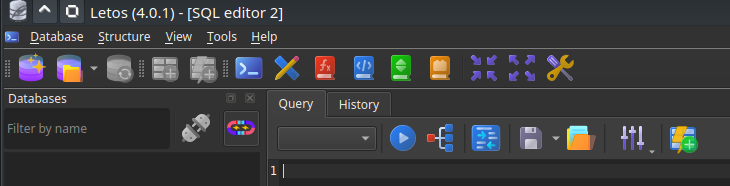
Official builds from letos.org now include an additional proprietary icon set licensed from Icons8, while the default open source icon set remains available.
The release also brings numerous bug fixes and usability improvements, including increased stability, Grid View refinements, improved Right-To-Left language support, platform-specific fixes, and various UI polish throughout the application.
The complete list of changes is available in the Changelog.
Letos 4.0.0 released
Posted on 23 June 2026Letos 4.0.0 is now available. This is the first major release under the new project name - Letos was formerly known as SQLiteStudio - and it is one of the largest releases in the history of the project.
Version 4.0.0 brings a new ERD editor, a move to Qt 6, native ARM64 builds, signed official packages, a refreshed high-DPI-ready interface, major improvements in data browsing and editing, and many smaller workflow improvements across the application.
Project renamed to Letos
SQLiteStudio is now Letos. Together with the new name, the project has moved to its new homepage: letos.org.
The goal remains the same: a free, open-source, cross-platform SQLite database manager focused on practical database work.
New ERD editor
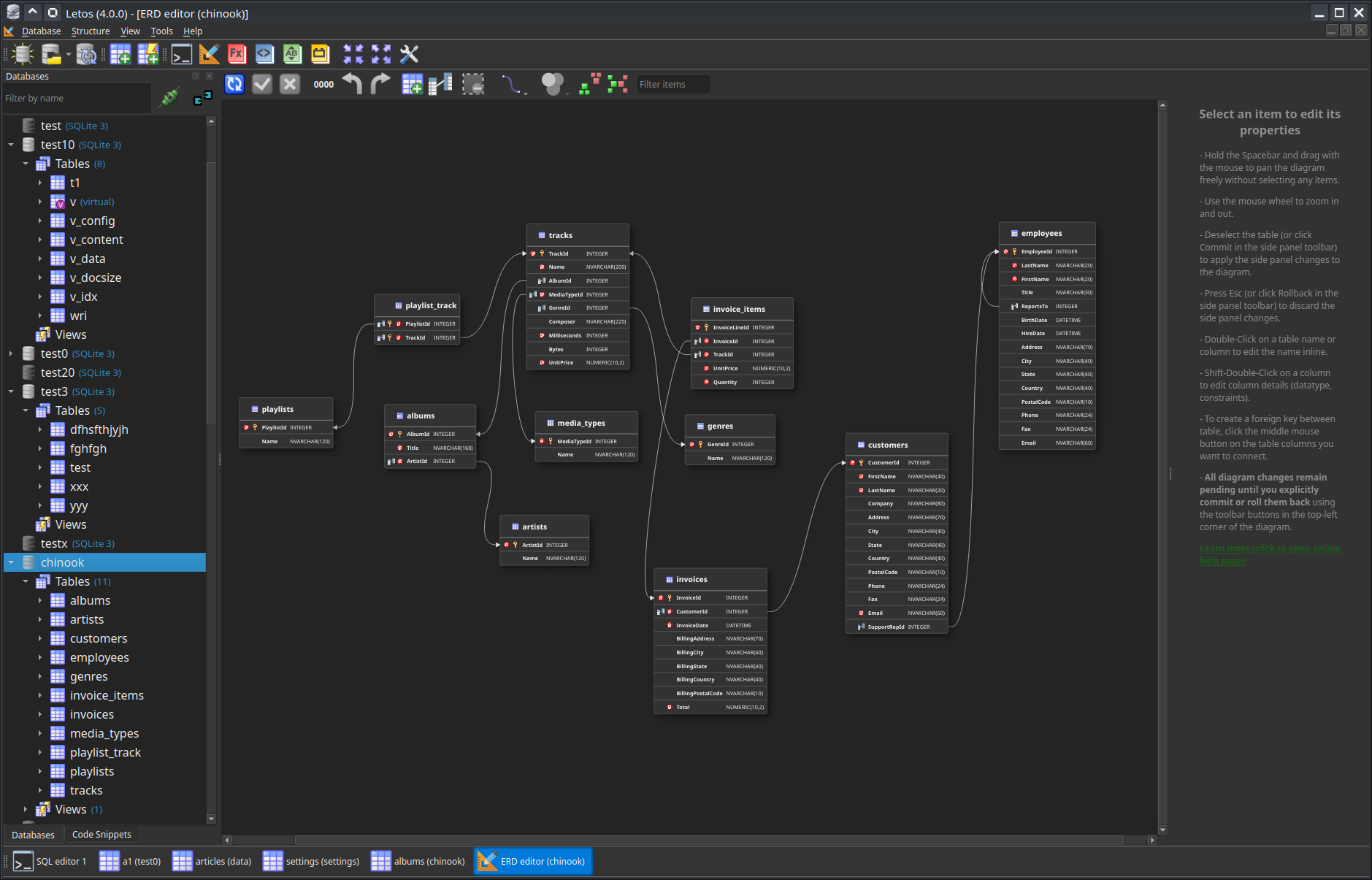
The largest new feature in Letos 4.0.0 is the new ERD editor.
It allows viewing, creating and editing database schema visually as a diagram. Tables, columns and relations can be inspected and manipulated directly on the diagram, making schema design and schema analysis much more convenient than working only from dialogs or SQL text.
Qt 6 migration and refreshed UI
Letos 4.0.0 moves the application from Qt 5 to Qt 6.
This brings several important technical improvements, including better support for high-DPI displays, improved dark-theme behavior, better platform integration and fixes for platform-specific issues such as accented characters on macOS.
The interface also received a visual refresh: raster icons were replaced with scalable SVG icons, toolbar icons can now be resized, and many dialogs and toolbars were cleaned up or simplified.
Native ARM64 builds and signed releases
Official Letos packages now include native builds for modern ARM64 systems:
- Windows ARM64
- Linux ARM64
- macOS Universal Binary, supporting both Intel and Apple Silicon Macs in one package
Official Windows builds are now signed thanks to SignPath.io, and macOS builds are signed with Apple Developer ID. This should make installation and first launch smoother and reduce operating-system security warnings.
Windows 32-bit builds are no longer provided.
Better data editing and browsing
Data browsing received many practical improvements.
Grid View can now render image data directly in cells through a plugin-based image renderer. JSON values can be edited with a dedicated JSON editor that supports syntax highlighting and validation.
Other Grid View and Form View improvements include pinned columns, remembered column widths and row heights, sum of selected numeric values, better handling of DEFAULT values, search in Form View text fields, faster access to the Value Editor, and loading or saving cell values directly from or to files.
Command Palette and faster navigation
Letos 4.0.0 adds a Command Palette, available by default with Ctrl+Shift+P.
It allows quick searching and execution of common actions, configuration options and other commands, reducing the need to navigate through menus and dialogs.
The Database List also became more useful as a central navigation panel. It can now be linked with the active MDI window, objects can be renamed inline, and tables, views or columns dragged into the SQL editor can generate SQL statements such as SELECT, INSERT or UPDATE.
SQL editor workflow improvements
The SQL editor now remembers files more naturally: when an SQL file is opened or saved, the editor is tied to that file and the association is restored in the next session.
Query results can now be displayed not only below the SQL editor or in a separate tab, but also on the right side of the query. This layout is remembered between sessions.
The SQL formatting action is now available in more places where SQL is edited, and Execute From File was improved with multiple execution modes, including support for SQLite CLI dot commands.
Improved export and import tools
Exporting was extended in several areas.
Views can now be exported together with their triggers and data. HTML exports now produce sortable tables. PDF and HTML exports can use custom headers and footers, and PDF exports can include the query used to produce the exported data.
SQL History can now be exported to a SQL file, and application configuration such as user-defined functions, collations, code snippets and extensions can be exported and imported from the Tools menu.
More languages
Letos 4.0.0 adds or completes many translations using AI-assisted translation work.
Newly added languages include, among others, Afrikaans, Arabic, Belarusian, Catalan, Czech, Danish, Dutch, Greek, Hungarian, Japanese, Korean, Norwegian, Portuguese, Romanian, Serbian, Slovak, Swedish and Turkish.
Several existing translations were also updated.
SQLite updated
The bundled SQLite library was updated to SQLite 3.53.2, bringing Letos up to date with recent SQLite improvements and syntax support.
Many fixes and smaller improvements
This release also includes a long list of smaller improvements and bug fixes across the application: SQL formatter fixes, better support for newer SQLite syntax, improved table modification logic, better PDF export, improved Wayland behavior, fixed user-defined collations, improved syntax highlighting, better code assistant suggestions, and many other refinements.
For the full list of changes, see the complete Changelog.
Also visit Gallery for more screenshots from features added in 4.0.0.
SQLiteStudio becomes Letos
Posted on 07 May 2026SQLiteStudio is being renamed to Letos.
Along with the new name, the project's website and online resources are being migrated from sqlitestudio.pl to letos.org.
The rename is intended to give the project its own independent identity and avoid confusion with the official SQLite project and its maintainers.
Apart from the name, nothing changes. The application remains free, open source, focused exclusively on SQLite databases, and continues to be actively developed.
Existing links and resources will continue to work during the transition period.
3.4.20 released
Posted on 06 January 2026A small bugfix release:
- Added missing syntax support for
ALTER TABLE RENAME COLUMN. - Added option to convert Unicode line/paragraph breaks (
U+2028/U+2029) to LN (\n) when storing value entered in the Form View. - Fixed issue with flushing WAL files when quitting application.
- Fixed next/prev page buttons if the data was refreshed while being on the last page.
- Fixed rendering Unicode line/paragraph breaks in Grid View.
Full Changelog.
3.4.19 released
Posted on 27 December 2025Yet another bugfix release. Most notably it solves problem with entering edit mode in data grid view - a problem introduced in 3.4.18.
Changes:
- Mentioned above fix for entering data in Grid View after it has got broken in 3.4.18 (entering editing mode by starting to type jumped to wrong cell).
- Database object filtering improved - both speed (3x) and reliability (i.e. typing while filtering is in progress).
- Increased precision for very small decimal numbers (like
1e-15). - Fixed formatting string literals in
WITH-CTEclause. - Updated syntax definitions to support
VALUESclause afterUNION ALL. - Fixed manual updates checking in case when automatic on-startup checking is disabled.
Full ChangeLog.
3.4.18 released
Posted on 05 December 2025Yet another bugfix release.
Changes:
- Updated the built-in SQLite engine to version 3.51.1 (SQLCipher remains on 3.46.1) and updated SQL Editor syntax support accordingly.
- Fixed editing functions, collations, snippets, extensions in their respecitve editing windows in case when user filters their lists by name.
- Improved SQL formatting. The formatter now handles CASE-WHEN-THEN-END more reliably.
- Table Window now allows sorting of triggers and indexes, with alphabetical sorting applied by default.
- Fixed scrolling issues in the Data Browser. Refreshing the grid no longer causes unexpected cursor jumps.
- ICU SQLite extension binary removed from binary packages, as its current version in incompatible with Qt 5 ICU libraries. It will most likely return in SQLiteStudio 4.0.0.
3.4.17 released
Posted on 23 February 2025A small bugfix release.
Changes:
- Fixed a crash when hovering over the Foreign Key icon in Table Structure view for FKs without explicit parent columns.
- Restored database list filtering by column/trigger/index names.